HVAC Load Calculator app icon

US · ACCA Manual J 8th Edition methods

Manual J load calculator for the field.

Run a real MJ8 load calc at the kitchen table — not back at the office. Eight inputs gets a ballpark. Sixteen gets the most detailed Manual J-based calc we make, with equipment sizes and a branded PDF the homeowner can read. Climate data and math ship on the phone, so crawlspaces and new builds with zero bars still work. Want to try the math first? The free online Manual J calculator runs the same engine in your browser.

  • iPhone & iPad
  • Android
  • Works offline
  • Free trial: 2 calcs + 2 PDFs
  • iCloud sync

Take Manual J offline. No signal required once the app is installed.

Who it’s for

For the contractor who knows the rule of thumb costs money.

Residential HVAC contractors and comfort advisors quoting replacements. You know the 400-square-feet-per-ton guess causes callbacks and oversized equipment. This Manual J load calculator app does the actual load math on site, then hands the homeowner a report with your logo on it.

  • Three levels of calc. Simple is 8 inputs for a quick estimate. Moderate is 15 inputs, within 10 to 15 percent of full Manual J. Pro is 16 inputs plus overrides for 5 to 10 percent accuracy.
  • Real MJ8 math. ACCA Manual J 8th Edition methods: F-factor slab losses, LBL N-factor infiltration, solar gain by window orientation, roof color, duct loss factors.
  • Equipment sizing built in. Manual S guidance shows the AC tonnages, furnace sizes, and heat pump sizes that actually fit the load, with oversize warnings and heat pump balance point.
  • Climate data by ZIP. ASHRAE 99 percent heating and 1 percent cooling design temps, pulled from your ZIP or GPS. All bundled in the app. No signal needed.
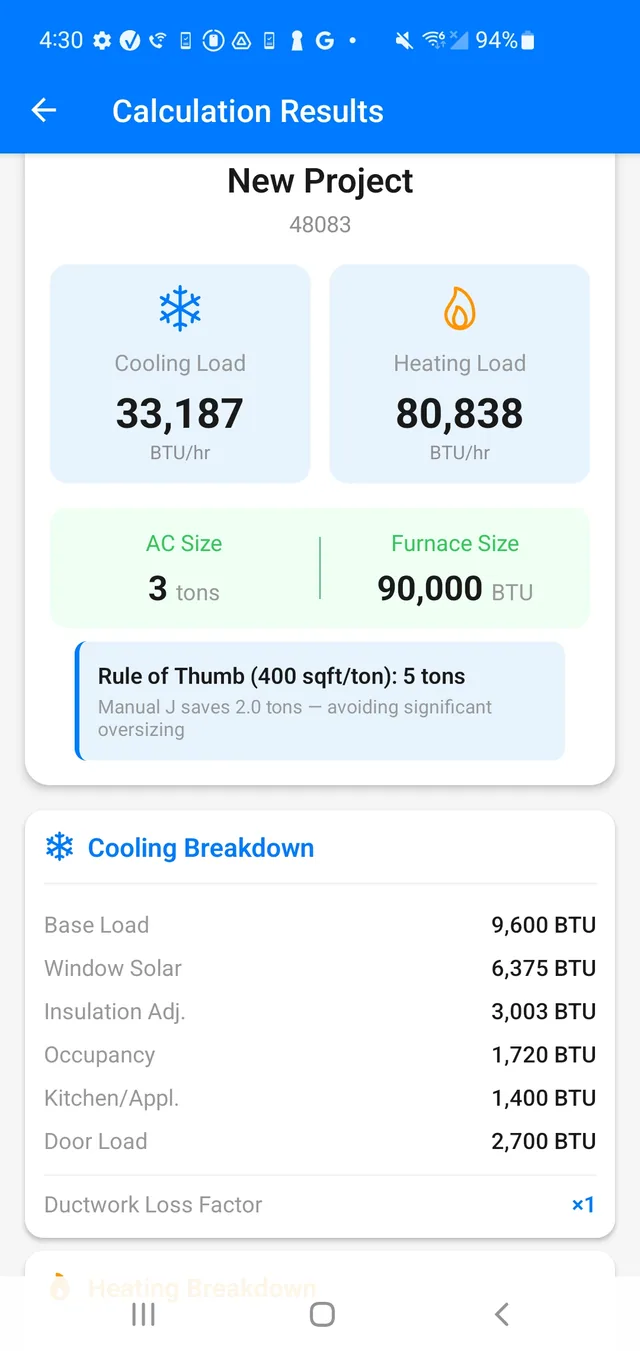
  • Beats the rule of thumb, and shows it. The results screen compares your calc against 400 square feet per ton, so the homeowner sees why the smaller unit is the right unit.
  • A report that sells. One tap generates a Home Comfort Assessment PDF with your logo and contact info, the load breakdown, MJ8 technical details, and up to 20 tagged site photos.
  • Field-proof. Offline first. Auto-saves every project. Syncs across your iPhone and iPad through iCloud.
  • Try it free. Two full calculations and two PDF exports before the Pro subscription kicks in.

In the field

From front door to signed report in one visit.

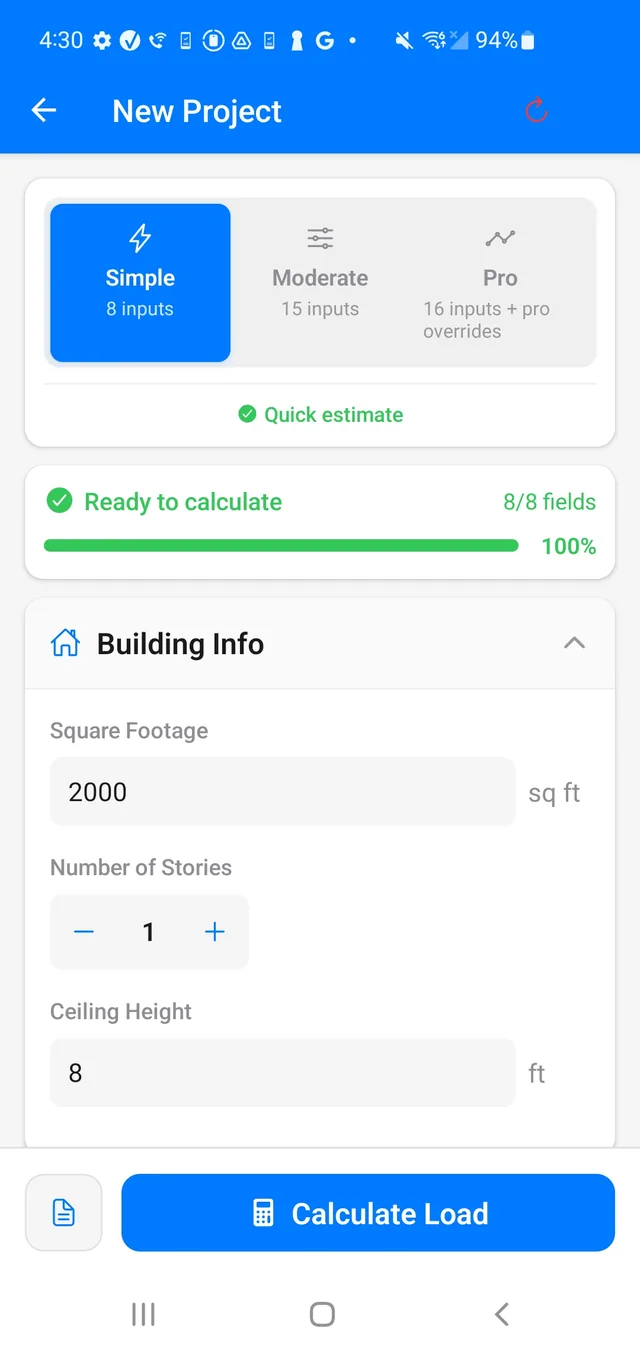
New project screen showing the Simple, Moderate, and Pro calculation mode selector with 8 of 8 fields ready
Pick your mode. Simple starts at 8 inputs.
Results screen showing cooling and heating loads, recommended AC and furnace sizes, and a rule-of-thumb comparison
Loads, equipment sizes, and the rule-of-thumb comparison.
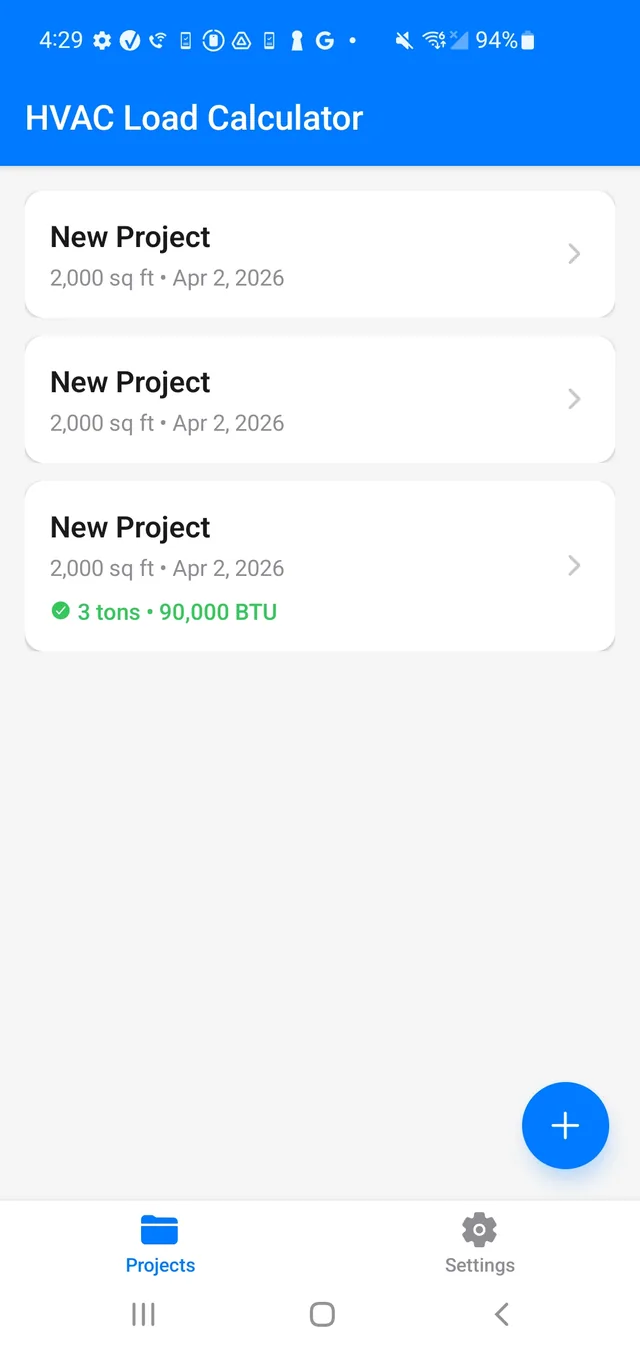
Projects list with a completed calculation showing 3 tons and 90,000 BTU
Every job saved. Pull it back up at the truck.

The numbers behind the numbers

Math you can defend to an inspector.

  • Design temperatures: sourced from ASHRAE Fundamentals and the Energy Star County Level Design Temperature Reference Guide, with full-ZIP mapping plus a ZIP3 fallback for national coverage, including climate zone and MJ8 daily range.
  • Manual S limits enforced: cooling capacity capped at 115 percent of load, heating at 140 percent, with oversize warnings when a size busts the limit.
  • Heat pump guidance: capacity at 47°F and 17°F plus a calculated balance point.
  • Metric option: SI units toggle and an international location mode for jobs outside US ZIP coverage.
  • PDF report sections: Property Details, Load Calculation Breakdown, Manual J 8th Edition Calculation Details, Detailed Inputs (Pro mode), and Site Assessment Photos.

Common questions

Manual J load calculator FAQ

What does a Manual J load calculation determine?

It estimates a home’s design heating and cooling loads from the building envelope, windows, infiltration, climate, occupants, and duct conditions. Those loads support equipment selection instead of relying on square-foot-per-ton rules.

Is this a Manual J load calculator app that works offline?

Yes. ZIP-based climate data and calculation methods are bundled with the app, so projects can be calculated and saved without a signal — crawlspaces, new builds, and basements included.

What if the design temperatures look wrong for my ZIP code?

The app maps your ZIP to the nearest bundled weather station, and in a few transition areas — coastal versus inland California, for example — the nearest station isn’t always the best match. Every calculation mode includes a Design Conditions card where you can edit the winter and summer design temperatures directly, and your loads recalculate from what you enter. Station coverage also grows with app updates.

Is this ACCA approved or a stamped Manual J report?

No. It is a professional estimating aid based on Manual J 8th Edition methods. It is not ACCA approved or certified, and it is not a substitute for a stamped load calculation where one is required. Verify whether your permit authority requires a calculation prepared or stamped by a specific qualified professional.

How accurate is the Manual J calc on the phone?

Simple mode uses 8 inputs for a quick estimate. Moderate uses 15 inputs and typically lands within about 10 to 15 percent of a full Manual J. Pro adds overrides for roughly 5 to 10 percent accuracy when inputs are complete and honest.

Does the app include Manual S equipment sizing?

Yes. Results include Manual S guidance for AC tonnage, furnace size, and heat pump capacity that fit the calculated load, with oversize warnings and a heat pump balance point.

Looking for Canadian F280 loads instead?

Use HVAC Load Calculator CSA F280 for Canadian postal-code climate data and CSA F280-12 heat loss methodology. This US app is built around ACCA Manual J 8th Edition.

Get it offline

Two free calcs. Carry Manual J when the signal dies.

Install once, then run loads in the basement, the attic, or a new build with no service. Your climate tables and MJ8 methods stay on the device.