What it is and isn't. The feature divides a calculated load between the systems in a house and, in Moderate and Pro mode, calculates each room from its own surfaces. It is an estimating aid, not a certified ACCA Manual J calculation and not a product pick. Final equipment sizing should be verified by a licensed HVAC professional.
Before you start
- Rooms have to exist. The feature works from the rooms you measured, by Room Scan or by tape. With no rooms the entry row does not appear and the whole-house result is exactly what it was before.
- Mode decides the method. Moderate and Pro projects get the room-by-room estimate: each room calculated from its own floor area, exposed wall, glass and ceiling, summed into its system. Simple projects get the planning estimate: the whole-house load divided between systems by what drives each part of it. Every card and every PDF table says which one you are looking at.
- It costs nothing extra. The screen is free in every mode. The PDF additions sit behind the report's existing export counter.
Step 1: open Room & System Loads
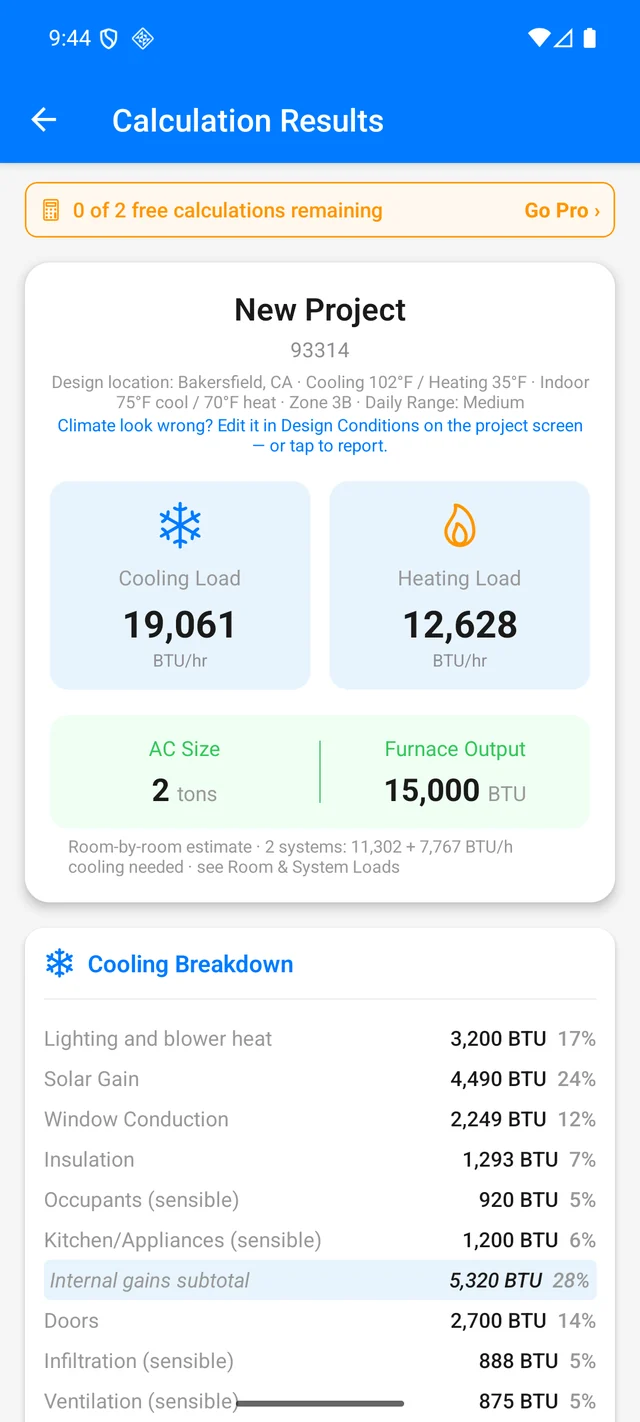
Calculate as usual. On Calculation Results, scroll to the Room Measurements card and tap Loads by system →. With one system the row reads Loads by room and system →. The first time in, the screen shows a short three-step card you can dismiss once you have the idea.
Until you set up systems, the screen shows one card, Whole house, with its room table underneath. That is already useful on a single-system house: each room's heating, cooling and design airflow (CFM) for duct sizing.
Step 2: set up systems
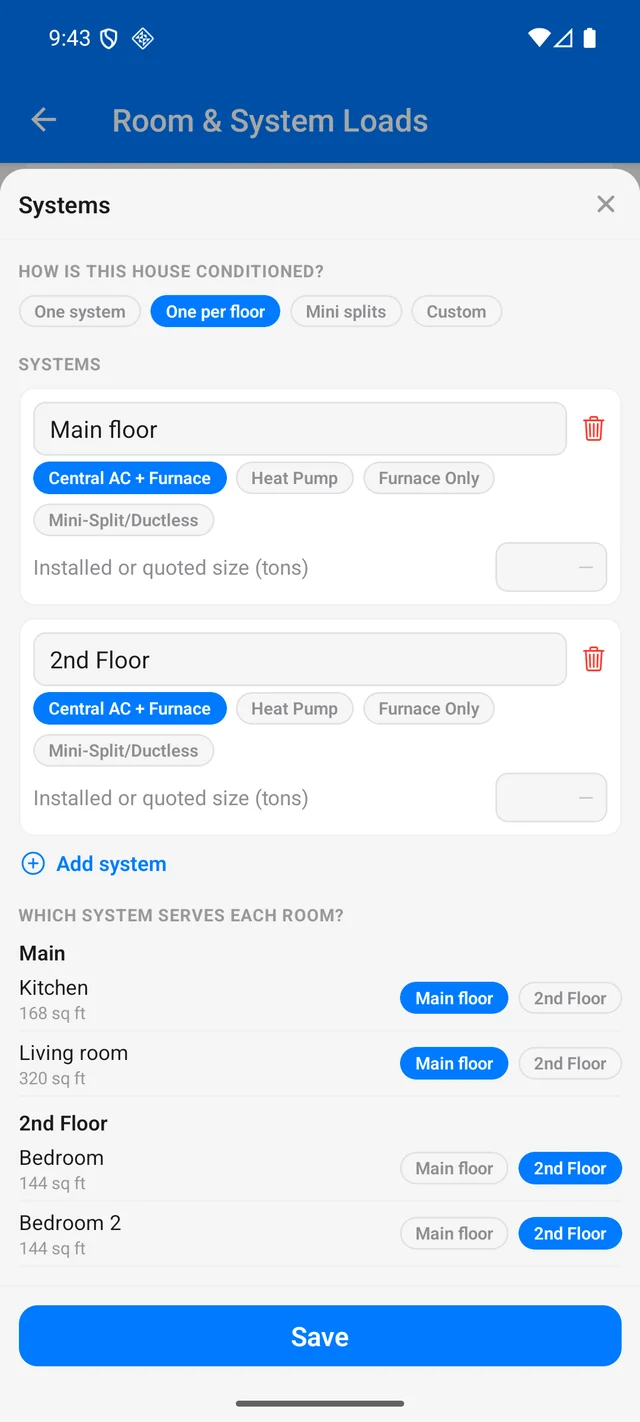
Tap Set up systems at the bottom. The sheet asks one question, How is this house conditioned?, with four answers:
- One system. The whole house on one unit. The default.
- One per floor. A system for each floor that has rooms, named Main floor, 2nd Floor and so on, with each room assigned to its floor's system. The basement joins the main floor. The common two-unit layout in one tap.
- Mini splits. One ductless system with one head per floor to start. Add heads and move rooms between them below.
- Custom. Start from the systems you have and add or rename as you go.
Each system card has a name, a kind (Central AC + Furnace, Heat Pump, Furnace Only, Mini-Split/Ductless) and an Installed or quoted size (tons) field. Enter the size on the quote or on the nameplate and the app tells you what percentage of the estimate it is. Below the systems, every room has a chip row: tap the system that serves it. Then Save.
Step 3: read each system's card
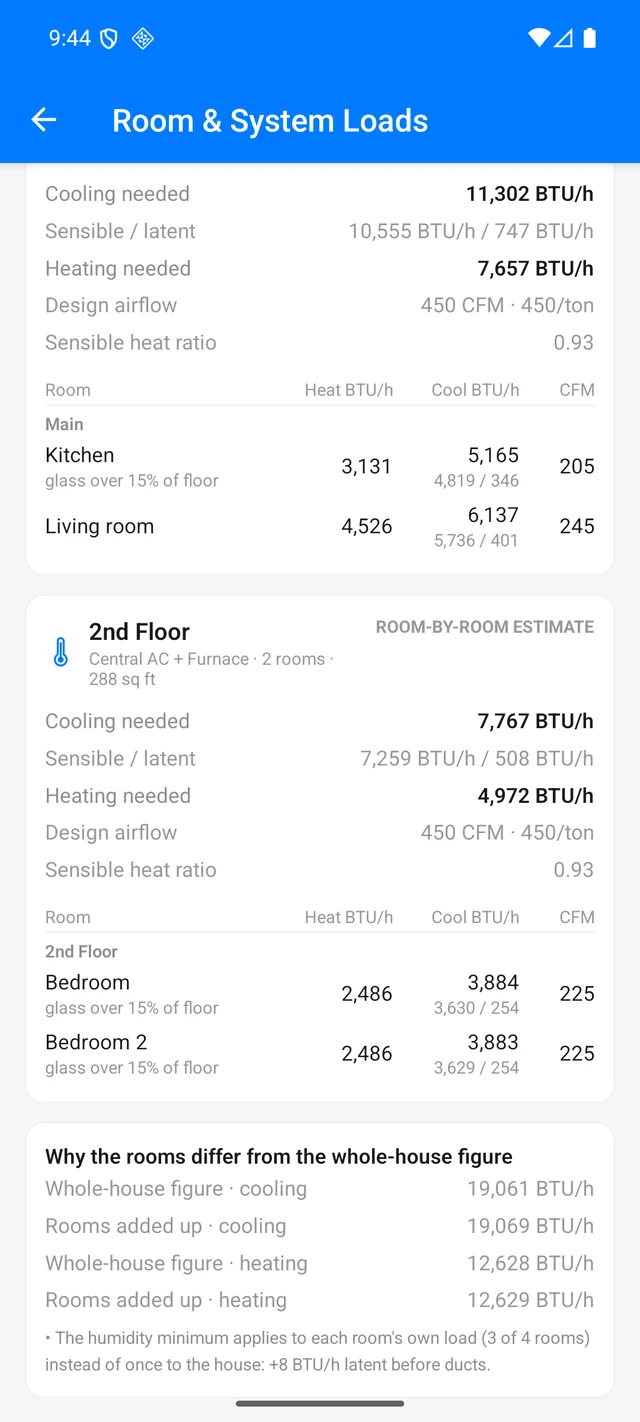
Back on the loads screen, there is one card per system. Each one shows:
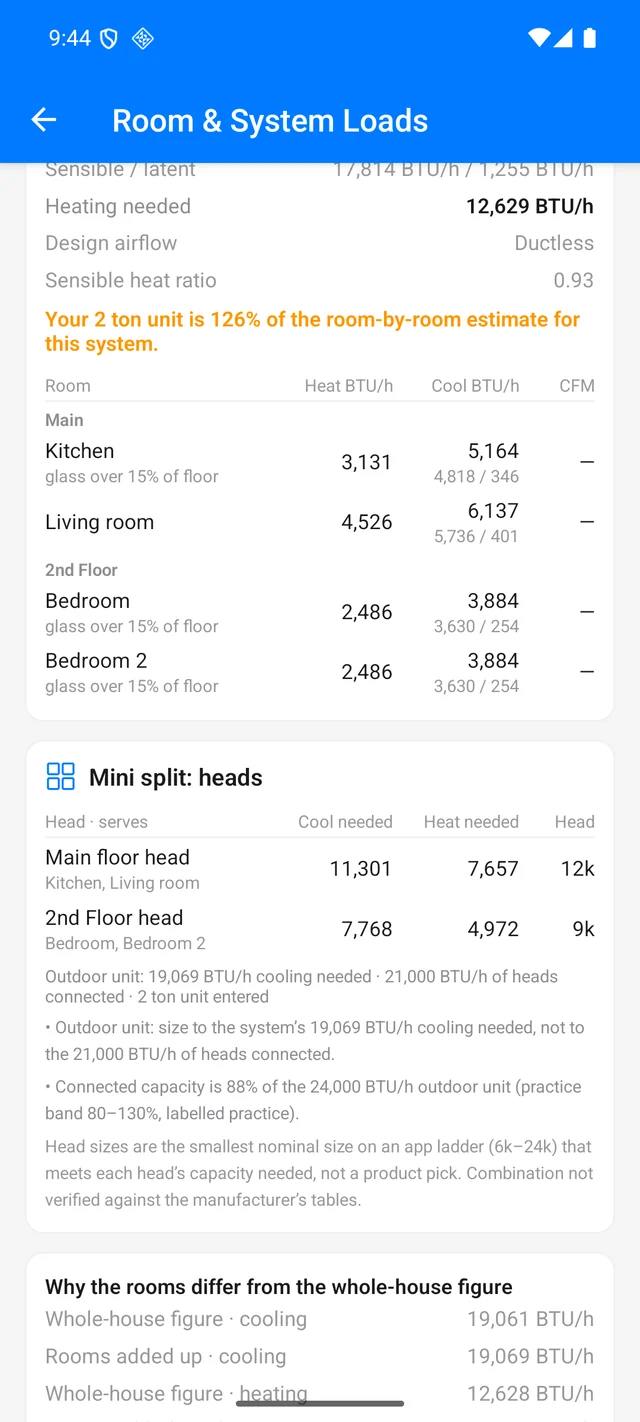
- Cooling needed, with sensible and latent beside it, and Heating needed.
- Design airflow at the system's recommended size (400 CFM per ton in a moderate climate), or Ductless for a mini split. This is for duct sizing, not a register size.
- Sensible heat ratio. Below 0.70 the card suggests whole-house dehumidification.
- The installed verdict, when you entered a size: "Your 2 ton unit is 160% of the room-by-room estimate for this system."
- A room table: every room the system serves with its heating, cooling (sensible / latent) and CFM, plus flags such as glass over 15% of floor, no exterior wall or windows face west.
Under the cards, Why the rooms differ from the whole-house figure lists the actual reasons the room sums land a little above or below the block load: a system that is ductless while the house figure carries attic ducts, a room using its own window orientation, the humidity minimum applied per room. If nothing differs, the card does not appear.
Step 4: mini-split heads
For a system of kind Mini-Split/Ductless, a second card, <system>: heads, lists each head with the rooms it serves, the cooling and heating it needs, and a head size: the smallest nominal size on a 6k–24k ladder that meets its capacity needed. In the Systems sheet you can Add head, rename heads, move rooms between them with the chip row, and enter the Outdoor unit size (tons).
The card then runs the checks that catch the three common mistakes:
- Outdoor unit sized to the heads. The outdoor line shows the system's cooling needed next to the heads connected, and says to size to the system, not to the heads added together.
- A head in every small room. A room under 3,000 BTU/h on its own head gets a note to share a head or a slim duct; a head more than 150% of its load is flagged.
- Turndown. A head or outdoor unit that cannot throttle low enough for its smallest zone is flagged against a 30% minimum output, which you can change per system to the manufacturer's figure.
Connected capacity outside the 80–130% practice band is noted. Every head card ends with the same line: the combination is not verified against the manufacturer's tables.
Step 5 (Pro): window facings
By default each room inherits the house's window orientation split. In Pro mode, each room card on the Rooms screen gains a Windows face row with N, E, S and W chips. Tap the direction a room's glass faces and that room's solar gain is calculated for that exposure. The room's row says windows face west and the reconciliation card explains the resulting difference from the whole-house figure. Tap the selected chip again to go back to Mixed.
Step 6: the PDF
Export the load report as usual. With rooms and systems set up it gains:
- A Room-by-room estimate by system table (or Planning estimate by system in Simple mode): heating, sensible, latent and cooling needed per system, SHR, airflow, unmeasured share and installed verdict, a Rooms added up row and the Whole-house figure row, with the reconciliation reasons underneath.
- A mini-split heads block per ductless system with the head schedule, outdoor-unit line and checks.
- Heating, Cooling and CFM columns on the Room Measurements table, with the assigned system per room.
The homeowner Proposal and the Room Report are unchanged.
Turning it off
Settings › App & Features › Room & System Loads. Off hides the entry row, the caption and every PDF addition, so the report is identical to the previous version's. Your systems setup is kept and comes back when you turn it on.
Video walkthrough
The same path, narrated, 2 minutes 35 seconds. Every screen is a real capture from the app. Chapters in the player match the steps above.
Prefer to read? The steps above are the same walkthrough. Open on YouTube for captions and chapters.
FAQ
Why don't the rooms add up to the whole-house number?
The whole-house figure is one block load with one duct treatment and one window orientation split. The room-by-room estimate gives each room its own surfaces and each system its own ducts, so the sums can differ by a few percent. The reasons are listed under "Why the rooms differ from the whole-house figure".
Planning estimate vs room-by-room estimate?
A planning estimate divides the whole-house load between systems by what drives each part of it (walls, glass, roof, floor, infiltration); no room is calculated on its own, so do not use it for final duct or equipment sizing. A room-by-room estimate calculates each room from its own surfaces. Simple mode gets the planning estimate; Moderate and Pro get the room-by-room estimate.
Does the head size tell me which mini split to buy?
No. It is the smallest nominal size on the app's ladder that meets the head's capacity needed. Check the combination against the manufacturer's tables, and size the outdoor unit to the system's load, not to the heads added together.
What about rooms I did not measure?
When the rooms cover only part of the entered floor area, the rest of the house is carried as an unmeasured remainder and shared out to the systems by floor, so every system's number covers the whole house. The card says how much of each system's figure is estimated for unmeasured space.